Google Gemini Nano Banana AI Saree trend takes over Instagram: What it is and how you can create one
By CNH Team
Table of Contents

Artificial Intelligence (AI) is changing the way we experience fashion, photography, and cultural styling. Following our popular guide on creating realistic figurine images, we're now diving into another viral trend: AI Saree Portraits. Generated with tools like Nano Banana AI or Google Gemini, these portraits let you upload your own photo and transform it into a glamorous saree look — without needing a physical saree or photoshoot.
In this guide, you’ll find:
- Why AI saree portraits are trending.
- A step-by-step guide to generating saree images.
- 20 Nano Banana AI Saree Prompts (exact, ready to copy-paste).
- Tips to get the best results.
- Privacy and legal notes.
Why AI Saree Portraits Are Trending
- Cultural Meets Digital – Blend the timeless beauty of sarees with futuristic AI art.
- Affordable & Accessible – No need for expensive sarees or professional photographers.
- Cinematic Aesthetics – From vintage Bollywood to Pinterest-style edits, everything is possible.
- Influencer-Friendly – Perfect for Instagram posts, digital art, or brand campaigns.
Step-by-Step Guide to Generate Saree Portraits
- Choose Your AI Tool – Open Nano Banana AI or Google Gemini.
- Upload Your Image – Use a clear, high-quality portrait photo.
- Copy a Prompt – Select one from the list below.
- Paste & Customize – Change saree color, background, or mood if needed.
- Generate Output – Wait for AI to create the artwork.
- Compare Versions – Generate 2–3 outputs and choose your favorite.
- Download in HD – Save in PNG (transparent) or 1920×1080 (for banners).
20 Nano Banana AI Saree Prompts (Copy-Paste Ready)
Here are all the prompts exactly as you provided. You can copy them directly into Nano Banana AI or Google Gemini.
1. Golden Hour Silk Saree
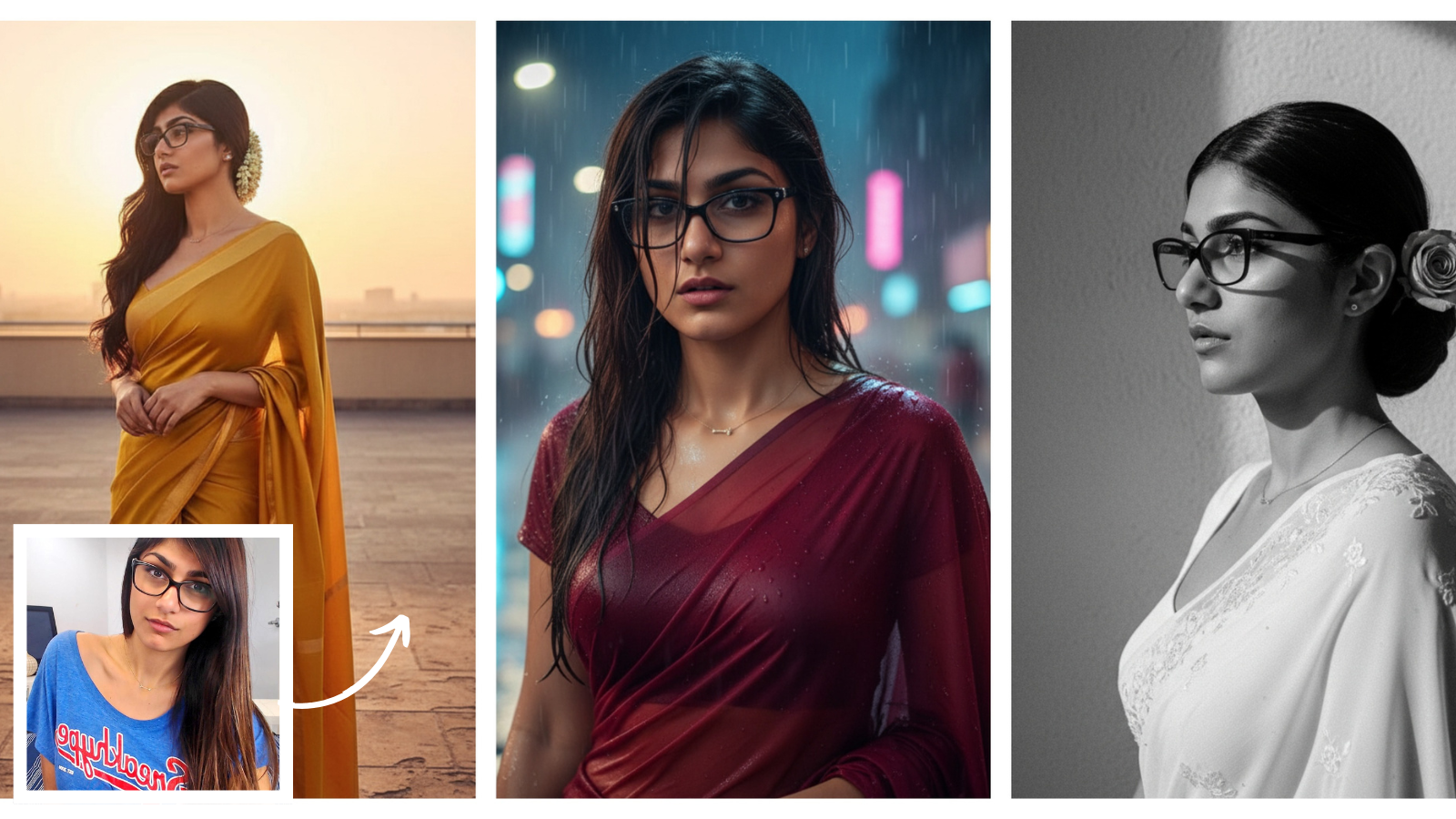
Transform the uploaded image into a cinematic HD portrait. Keep the face unchanged. The subject should be draped in a flowing mustard-yellow silk saree with a thin golden border, styled in a Pinterest-inspired fashion. Her long, glossy black hair should be softly wavy, with a jasmine flower garland tucked elegantly behind her ear. The background should feature a terrace bathed in golden sunlight, where the glow highlights her profile and casts a delicate shadow. The mood should feel dreamy, retro, and artistic.2. Vintage Black & White Saree Portrait
Convert the uploaded photo into a timeless monochrome portrait with a subtle film-grain texture. Keep her facial features as they are. She should be wearing a white chiffon saree with delicate embroidery, draped in an old-Bollywood-inspired style. Her hair should be neatly tied in a low bun, with a single rose tucked into the side. The background should be a plain textured wall with dramatic side lighting that casts bold shadows. The atmosphere should feel elegant, vintage, and cinematic.3. Rain-Soaked Saree Aesthetic
Enhance the uploaded picture into a cinematic rain-inspired portrait. Keep the face identical. The subject should be draped in a deep maroon georgette saree, slightly wet as if caught in the rain. Her silky dark hair should appear damp, with strands falling naturally across her face. The background should depict a blurred rainy street with glowing neon reflections, creating a moody, modern-meets-retro Bollywood look. The mood should be romantic, dramatic, and enchanting.4. Pinterest-Style Pastel Saree
Convert the uploaded image into a Pinterest-inspired retro portrait. Keep the facial features untouched. The subject should be wearing a pastel pink organza saree with delicate floral embroidery. Her hair should be styled in a half-up, half-down look with soft curls, and a small flower should be tucked into her hair. The background should feature a rustic wooden window with filtered sunlight casting patterns on the wall. The overall atmosphere should be dreamy, nostalgic, and cinematic.5. Minimalist Black Saree Look
Transform the uploaded photo into a minimalist retro HD portrait. Keep the face unchanged. The subject should be draped in a plain solid-black saree with a bold red border, styled elegantly. Her hair should be sleek, straight, and flowing naturally, with a single flower tucked into one side. The background should be a plain beige wall illuminated by soft golden lighting from above, creating artistic shadows. The mood should be bold, timeless, and Pinterest-inspired.6. Chiffon Saree Bollywood Retro
Convert the uploaded image into a cinematic retro portrait. Keep her facial features intact. She should be wearing a flowing chiffon saree in pastel peach, styled like a 90s Bollywood heroine. Her hair should be voluminous with loose curls blowing slightly in the breeze. The background should feature a soft spotlight with faint haze, mimicking a vintage movie set. The mood should be glamorous, nostalgic, and cinematic.7. Banarasi Saree Glow-Up
Transform the uploaded picture into a regal HD portrait. The subject should be draped in a traditional Banarasi silk saree with golden zari work. Her hair should be long, glossy, and decorated with jasmine flowers. The background should be a temple corridor lit with diyas, casting a warm golden glow across her face. The mood should feel traditional, festive, and cinematic, like a scene from a cultural film.8. Neon Saree Night Look
Convert the uploaded photo into a modern retro night portrait. Keep her face unchanged. The subject should be wearing a shimmery navy-blue saree with metallic accents. Her hair should be tied in a chic high bun. The background should feature glowing neon pink and blue lights on a rainy street, with reflections adding depth and drama. The mood should be stylish, mysterious, and cinematic.9. Sunset Terrace Saree Portrait
Enhance the uploaded picture into a warm sunset aesthetic. The subject should be draped in a peach georgette saree that flows gracefully. Golden sunlight should illuminate her face from the side, casting a soft shadow on the wall behind her. The background should feature a terrace railing with a distant city skyline. The atmosphere should feel romantic, artistic, and serene.10. Vintage Grain Saree Photo
Convert the uploaded image into a grainy retro portrait with high artistic contrast. The subject should be draped in a plain cotton saree in earthy tones. Her hair should be styled in a loose braid with a small flower tucked in. The background should feature an old wooden door with deep shadows adding mystery. The mood should be rustic, vintage, and soulful.11. Rainy Window Saree Mood
Transform the photo into a moody cinematic portrait. The subject should be draped in a soft sky-blue saree, her hair styled loosely as she gazes out of a rain-drenched window. Neon reflections should shimmer on the glass, creating a dreamy Bollywood-inspired atmosphere. The vibe should be pensive, romantic, and artistic.12. Monochrome Saree Magic
Convert the uploaded image into a bold monochrome HD portrait. The subject should be draped in a dark saree with minimal accessories. Her hair should be flowing freely, framing her face. The background should remain simple but dramatically lit, with strong shadows enhancing the mood. The overall effect should be elegant, artistic, and timeless.13. Floral Saree Pinterest Aesthetic
Reimagine the uploaded picture into a Pinterest-style HD portrait. Keep the face unchanged. The subject should be draped in a floral organza saree in pastel shades. Her hair should be styled in soft waves with a tiny flower tucked into one side. The background should feature a whitewashed wall with green vines creeping up. The atmosphere should be soft, feminine, and aesthetic.14. Red Saree Cinematic Shot
Transform the photo into a 4K cinematic portrait. The subject should be draped in a bold red saree with sequins that shimmer under light. Her hair should be voluminous and styled glamorously. The background should feature a spotlight glow with faint smoke for a dramatic effect. The mood should be powerful, glamorous, and Bollywood-inspired.15. Temple Saree Retro Look
Convert the uploaded image into a traditional cinematic portrait. The subject should be draped in a Kanjivaram silk saree with a golden border. Her hair should be tied into a bun adorned with jasmine flowers. The background should be a carved stone temple lit by diyas, creating a sacred glow. The mood should feel vintage, cultural, and devotional.16. Rain-Dance Saree Style
Transform the uploaded picture into a retro Bollywood rain-dance portrait. The subject should be draped in a glossy silver saree, wet as though she’s in the rain. Her damp hair should cling gracefully to her face. The background should feature blurred stage lights in vibrant hues. The mood should be dramatic, romantic, and cinematic.17. Vintage Saree on Steps
Convert the uploaded photo into a rustic retro portrait. The subject should be seated gracefully on old stone steps, draped in a green handloom saree with a golden border. Her hair should be tied in a soft bun with a flower tucked in. The background should feature a faded heritage building, adding character. The mood should be earthy, vintage, and artistic.18. Midnight Saree Glow
Enhance the uploaded image into a magical nighttime portrait. The subject should be draped in a midnight-blue velvet saree paired with silver jewelry. Her hair should be styled in soft waves. The background should feature a starlit sky with lanterns glowing softly. The mood should be enchanting, cinematic, and dreamy.19. Retro Grainy Banarasi Shot
Convert the uploaded image into a vintage grainy portrait. The subject should be draped in a Banarasi saree with bold patterns. Her hair should be tied back with a flower tucked in. The background should be plain but softly lit, with dramatic shadows enhancing the retro feel. The vibe should be calm, regal, and timeless.20. Golden Saree Retro Mood
Transform the uploaded photo into a regal HD portrait. Keep the facial features identical. The subject should be draped in a shimmering golden saree that catches the light. The background should feature a warm spotlight creating a halo glow around her. The atmosphere should feel luxurious, artistic, and Pinterest-inspired.Tips for Better Results
- Be specific about saree type, color, and accessories.
- Always mention “preserve facial likeness, skin tone, and hair”.
- Add background details (temple, terrace, rainy street) for realism.
- Export in PNG for products or 1920×1080 for banners.
- Generate 2–3 outputs to choose the best one.
Privacy & Legal Notes
- Upload only your own photos or those with permission.
- Do not upload minors’ images.
- Outputs are stylized figurines, not exact replicas.
Frequently Asked Questions (FAQ)
Why are AI saree portraits trending?
AI saree portraits are trending because they blend timeless cultural fashion with futuristic AI, are affordable, allow for cinematic aesthetics, and are perfect for social media content.
How do I generate an AI saree portrait?
To generate a portrait, choose an AI tool like Nano Banana AI or Google Gemini, upload a clear photo, copy and paste a detailed prompt, customize it if needed, and generate the image. It's best to create a few versions to find the perfect one.
What are some tips for better results?
For better results, be specific about the saree type, color, and background. Always include a phrase like "preserve facial likeness" to keep your identity. Define the mood and export in a high-quality format like PNG or HD.